Friday, September 11, 2009

Purchasing/maintenance Questions for 1:1 programmes

Having been through a year of 1 to 1 laptop use in our school I am preparing for a workshop at ulearn09 looking at what schools need to prepare for 1 to 1 learning. Many people will be seeing this as a simple transition to a greater density of devices on their networks. The best way for us to decide and think about this is probably to consider the implications of future events. The following are discussion starters for some important questions in this process.

  • We have got 50 devices and over half of them are having a problem with not starting up properly what should we do?

  • We can get a high power laptop for the same price as a netbook that should be better?

  • What are the hidden costs of this programme? are there any?

  • Should the parents/students be able to bring any laptop of their choice?

  • The device choice is not too important most devices today are of a good quality let’s just get on with it?

  • A parent is able to secure a good deal on a netbook for us should we take it?
  • And the answers are…
    Well ok No answers but there is no doubt these are important questions. We have had to increase our network support in-house to accommodate this. We purchased a very robust looking computer the classmatepc. We have 130 of these being used by year 7 students who take them home and we have had dealt with one issue that effected over 50% of these. So the two Big Answers To Purchasing and maintenance…

    image

    • a warranty for three years
    • proven track recording the student space
    • nothing that can be pulled off
    • has protective bag
    • no point of stress eg tablet with only one central hinge
    • battery guides so pins cant get bent
    • a sturdy mechanism for where the power cable from adapter will go

    And

    image

    • understand the supply chain
    • ask for an open book submission which shows cost from manufacturer
    • look at what added value they can provide
    • will they attend information evenings
    • how will they prepare the units for you
    • manufacturer has an online knowledge base with forums, usergroups etc

    Possible scenarios that might make sense

    If you do not have on site tech support provide a service where the device can be dropped off at the schools reception desk and picked up by supplier from there.

    If you need tech support to be managed by parents the information evenings and


    Here is an example of an RFP (request for proposals) that may help you if you want to use one.

    Rfp Netbook Template


    Monday, August 31, 2009

    Reality Check 4


    Wednesday, August 19, 2009

    Reality Check 3

    Working with Year Eight students on Digital storytelling aspects the following is the sketch of what and how we will work.

    Most important part I think In the Session

    1. work out what we know
    2. have clear learning intentions
    3. interact with each other
    4. try to allow cognitive rehearsal for thinking
    5. create new personal knowledge


    From an earlier collaboration with another teacher

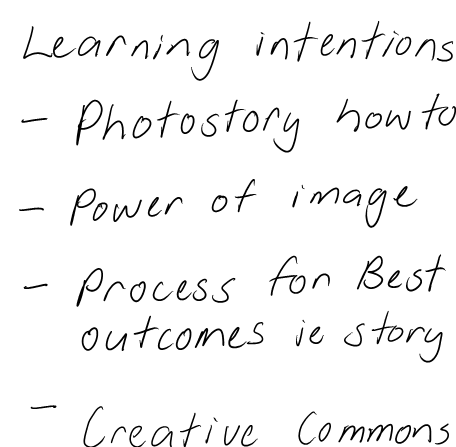
    the following are the learning intentions

    image

    What is a digital story ? Look at three of these on these sites.

    http://lc.celebrateoklahoma.us/

    http://seein2it.wikispaces.com/Digital+Storytelling


    Activity

    Give 1 get 1. Move around the room give someone an idea about

    What a digital story is ? and

    • Story like
    • Emotional
    • One person speaking
    • Transition of pictures
    • Similar to a movie
    • Pictures of what it is about
    • About a personal view of someone
    • Past tense
    • Music or Song
    • Pictures are still
    • Pictures and voice describing

    What it Isn’t

    • A movie
    • Made up
    • Moving pictures
    • Voices out of pictures
    • Just all facts


    Look at a factual survival story


    http://en.wikipedia.org/wiki/Uruguayan_Air_Force_Flight_571#The_crash_and_rescue


    Fact to fake narration

    The students came up with these ideas

    • Good hook
    • Tense : generally Past/flashback. Present .Future
    • 1st person 3 rd Person
    • Ending in a question (keep people wondering)
    • Balancing fact and experience/emotions
    • Diary form
    • Suspense
    • Point of view

    Read the article highlight important facts perhaps collect facts as a group. the article is too big and needs to be reduced if one session is used for whole activity.

    Write this as a narration

    Reflect at end what was good learning what wasn’t any comment you would like to make.


    Wednesday, August 12, 2009

    Googledocs a quick learn

    We are starting to use google docs for our students

    Why for those who are not sure?


    Once we get over the wow look at this, look at that; we need to focus on how to improve learning.

    Nick Rate has a good idea for writing the pic below links to his full post with examples.


    highlighter

    Colours could also be used to identify (multiple concurrent authors is powerful learning just ask Vygotsky)

    • ownership
    • parts of speech
    • editing process
    • thought process
    • de bonos thinking hats
    • perspectives
    • main ideas
    • disagreement
    • discussion points


    This Google presentation has some other good ideas


    I am working with some teachers on this tomorrow and it needs to be about teaching and learning

    the good thing with google docs is I know it can be just that.


    Monday, August 10, 2009

    Easi-speak Guide

    imageThere are some good introductions to the USB easi-speak microphone on

    Lorraine’s and Dorothy’s blogs.

    The following was recorded easy on the easi-speak

    I think these are going to do great things for literacy where teachers cotton on to it


    I have just copied some pics from the manual which is stored as a pdf on the

    microphone itself. most of it is self evident but I have highlighted the bits I wasn’t sure of.


    image

    imageimage

    image 

    See you later I’m off to record some stuff add ideas for the mic’s use in comments if you like. Those of you at Southwell can borrow them from the ICT hub and I am happy to come and help out if you are interested.


    Monday, August 3, 2009

    Te Mihi


    utterli-image
    Trying to finish my mihi and record it. Will work on it over the next while and try to add to it next year.

    Mobile post sent by davein2it using Utterlireply-count Replies.  mp3


    Te Mihi

    Been working on my Mihi I have recorded it on utterli as well.

    It felt good to find out where I come from and to be able to acknowledge

    the Maori language and its part in our identity.

    Taku                      Mihi Meaning                          
    Ko David ahau I am David
    Ko Ngati Tahu te iwi My tribe is Ngati Tahu from the South Island
    Ko Rakeahua te awa Rakeahua is my River

    Ko Rakeahua te Maunga

    Rakeahua is my Mountain
    Ko Alyn taku papa My father is Alyn
    Ko Dorothy taku mama My Mother is Dorothy

    They are both Dead now but their spirit is still with me

    A good resource for this is here http://www.tki.org.nz/r/language/lls/wehi/units/unit14/index_e.php

    Examples from Pt England school are here http://softwareforlearning.wikispaces.com/eStory2