Showing posts with label blogging. Show all posts

Tuesday, August 31, 2010

Learning to collaborate? – Games can help

Did anything come out of our collaboration using the Xbox game viva piƱata yes it did!

A recent Visit From Ewan McIntosh Reminded me of some key factors

  • A shared interest or goal makes for a good opportunity to share: blogs and information. It creates that purpose for communication
  • Problems often require communication to solve: a puzzle is a good place to start a collaboration
  • When you are describing something new and dynamic you can’t rely on others you have a unique experience to describe
  • The imaginary world of games reflects the real world, presenting lots of opportunity to think and bring ideas together

Next Term a Syndicate at school has decided to put an Xbox in each class and use them for Creative Writing. I am excited by the  prospect of this an hope that I can be involved in some way. Will blog about this as it takes place.

  • There is still a lot of reluctance to recognise the

    potential

    of Games in Learning
  • Viva la revolution

Learning to collaborate? – Games can help from Media team on Vimeo.


Sunday, December 27, 2009

A simple slideshow embed

I have put a few tables with photos into my blog. I was thinking a slideshow might be better take up less space, run itself and be more attractive. I found a page you could copy the address for a Picasa slideshow into as with many things a little further investigation and I learnt how to do this directly from within Picasa YAY. Here is a video showing how easy this is to do and a sample slide show below.


Here is a sample slide show. Some of the pics have been altered to make up the banner for my blog which feature my mum Dorothy or Dot as she was known. My brothers and sister also appear in some of the pictures. Need to add a few more in memory of Mum. Mum I miss you!


Wednesday, July 29, 2009

Iframe YouFrame Weframe

image

Part of the connected nature of the web is the ability to embed and display image flash etc. Heath Sawyer aka heheboy showed me what he was doing with iframes in one of the wetpaint wikis he is working with for the Matamata ictpd Cluster. Iframes are a good way to include one webpage in another.

The code looks like this

Basic iFrame HTML Code is in red I just copied it and changed the yourdomain to put the I love learning site in a frame below.

<IFRAME NAME=" my_iframe " SRC=" http://www.yourdomain.com" WIDTH="90%" HEIGHT="300px"> <p> Browsers and spiders that can't read iframe code will see this text instead.</p> </IFRAME>

Here's what each part means:

SRC - The URL of the page that you are including in the iframe.

HEIGHT - The height of the iframe. This can be expressed in pixels or percentages.

WIDTH - The width of the iframe. This can be expressed in pixels or percentages.

NAME - The name of the iframe.

Optional iFrame Properties

If you want more control over the look and behavior of your iframe, you can choose to add the following iframe properties to the code.

  • SCROLLING - Should the iframe content scroll? Possible values are "yes", "no", or "auto".
  • FRAMEBORDER - Would you like a border around the iframe? Possible values are "yes" or"no".
  • ALIGN - How should the iframe be positioned in relation to surrounding content? Possible values are "left", "right","top", "middle" or "bottom". - Note: This setting is depreciated in favor of styles
  • MARGINWIDTH - The horizontal internal margin for the iframe. Must be expressed as pixels.
  • MARGINHEIGHT - The vertical internal margin for the iframe. Must be expressed as pixels.
  • HSPACE - The horizontal spacing around the iframe. Must be expressed as pixels.
  • VSPACE - The vertical spacing around the iframe. Must be expressed as pixels.
  • LONGDESC - The URL of the page with a long description of the iframe contents. Must be expressed as a URL.

Here is an example of an inline frame with many of the optional iframe properties set:

<IFRAME NAME="my_iframe" SRC="http://www.yourdomain.com " WIDTH="90%" HEIGHT="300px" SCROLLING="NO" MARGINWIDTH="10px" MARGINHEIGHT="10px" FRAMEBORDER="0"> <p>Browsers and spiders that can't read iframe code will see this text instead .</p> </IFRAME>


Sunday, July 26, 2009

The Dog Woke Me, The Blog called Me

It’s 2.59 and the dog has come around to the front of the house and woken me. There have been a lot of thoughts in my head about blogging its relationship to learning and now am in front of the computer putting them down.


A New Zealand teacher posted some pictures of students running a cross country. The purpose of this was for parents to be able to see their children and the children to see themselves online. What followed was a series of opinions criticising the use images and names and implying the teacher should not be blogging because of lack of understanding of net safety and protocol. What a post on whaleoil's blog shows in my mind the need to prepare for comment or controversy where we least expect it.

Can we just grow up in public?

We engage in blogging to change our personal or community worlds. A post is out in the global domain may  be seen as a statement even if we don’t intend it to be. A process is taking place where we are often adjusting our thinking, forming opinions and learning.

  • What happens if we don’t follow protocol?
  • We say something that our schools for example don’t believe in?
  • What happens if we make a mistake?, Have a bad moment?
  • What happens if someone takes issue with what we have to say?
  • What are the risks if we are blogging at school as a classroom community?

Firstly I do not believe the greatest risks are from Stalkers or paedophiles as some would have us think. A photo and a student’s first name is a responsible risk. In New Zealand the ministry of education guidelines for inclusion of images is here. With parents permission there is no issue here.  The teacher posted some pictures of students running a cross country. The purpose of this was for parents to be able to see their children.The greatest risk I see with blogging are pedants and nitpickers.

image

To help survive this risk

  • find out about blogging from an experienced leader, doer and thinker such as Dorothy Burt
  • try to make sure our words make sense (not always a strong point of mine)
  • read other class blogs and online material
  • realise that our audience may not be who we think they are
  • care mostly about our preferred audience (the one we want to engage)
  • develop a thick skin i.e. accept that we may fail at first but that is not a bad thing
  • moderate comments if it is a class blog or students
  • think about the content of other online presences we may have and how they are linked eg facebook

Also realise the benefits of blogging

We can see blogging changing peoples personal worlds and creating


 image

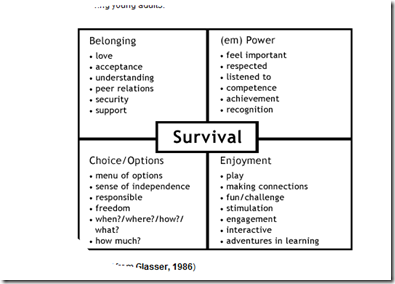
Blogging should be innately positive because it is based on choice

With so many people choosing to express themselves there seems a good match to

William Glassers model of Survival. Are we blogging for Survival? I have used this model

a few times and acknowledge Joan Dalton and David Anderson who introduced me to it.
image

So keep up the blogging or start if you wish to.

For Me I am looking to Work out what it means for our school as a community this term.

There are some more thoughts here in a guide to educational blogging from Microsoft.

And a more comprehensive reflection http://learningweb2.wikispaces.com/Important+considerations