Thursday, September 16, 2010

Reality Check Inventions

The Students have designed some inventions and spoken about the on ustream.
I was impressed by the creativity that went into ideas such as the “ultimate hair brush”,
”The Magniball wall” and the “Super Alpaca feeding station”. The ability to adapt, change and think in different ways shows that young students are able to move from designing to inventing. Well done.

It takes bit of strength to get up in front of the camera. There is a pause for about 30 seconds while one student gets up the courage to show what they invented.


Tuesday, August 31, 2010

Learning to collaborate? – Games can help

Did anything come out of our collaboration using the Xbox game viva piƱata yes it did!

A recent Visit From Ewan McIntosh Reminded me of some key factors

  • A shared interest or goal makes for a good opportunity to share: blogs and information. It creates that purpose for communication
  • Problems often require communication to solve: a puzzle is a good place to start a collaboration
  • When you are describing something new and dynamic you can’t rely on others you have a unique experience to describe
  • The imaginary world of games reflects the real world, presenting lots of opportunity to think and bring ideas together

Next Term a Syndicate at school has decided to put an Xbox in each class and use them for Creative Writing. I am excited by the  prospect of this an hope that I can be involved in some way. Will blog about this as it takes place.

  • There is still a lot of reluctance to recognise the

    potential

    of Games in Learning
  • Viva la revolution

Learning to collaborate? – Games can help from Media team on Vimeo.


Thursday, August 26, 2010

Connected Schools – Six mths in

We have been working as a professional learning community for six months and we can see impact in the video below.

With the project comes regional goals and as leaders what I see as crucial now is:

  • Communication with other schools (newsletter coming)
  • Collaboration with others like the University and Polytechnic
  • Clear internal roles such as (organiser secondary voice)
  • Sharing of successes and failures (learning)
  • Strategic planning for sustainability and engagement
  • The creation of Reuseable and AAA (anytime ,anywhere, anyhow) material

Great to watch a lot being picked up from our community development day and being used by the students,
EBooks , Voicethread, numeracy interactives. This will make for engaged learners and improved learning outcomes.

Connected Schools Six Months in from Media team on Vimeo.

Hamilton Schools working together to create a professional learning community for themselves and other educators.


Wednesday, August 25, 2010

Digital Citizenship – a big ask

We have students with connectivity and a number of choices to make.
We can protect them to a certain extent and of course we do by filtering and
education B U T in the end we can only do so much ….

I have spoken to students about this and asked them to collaborate on a document where they are asked

What we think as students about digital citizenship.....
What the school should do about students who download age restricted material is ...
How the School should try to protect students from things on the internet is ...
Should the school lock down computers so that we can't install anything ? Why ? Why Not?
What we should be able to do with our computers is...
What we shouldn’t be able to do with our computers is...
Questions we have around digital citizenship are.

Will post back what this group thinks soon


Monday, August 23, 2010

6 Word Stories

6 Word Stories

Describe / Reflect / Wonder about these pictures in 6 words. Remember to write your name


Attribution:
www.flickr.com/photos/14239765@N00/535851460
Attribution:
www.flickr.com/photos/21222992@N00/1682989

Attribution:

www.flickr.com/photos/7764981@N05/2646109147


Leave some feedback for someone else in a different colour


Tuesday, August 10, 2010

Inventions Scamper

Inventions Scamper

When we invent something we might have to look at something a different way and change things. This one way to help us think about things in a different way.

  • S = Substitute
  • C = Combine
  • A = Adapt
  • M = Magnify
  • P = Put to Other Uses
  • E = Eliminate (or Minify)
  • R = Rearrange (or Reverse)
dog bowl

Substiute - change metal for waterproof foldable plastic
Combine - a bowl that has a cushion pillow as part of it
Adapt - build the bowl into the deck of the house so sunk into floor
Magnify - make it so the bowl collects water from the roof or get fed from a tank
Put - it over a dogs mouth as a muzzle
Eliminate - foldable makes it flat and small
Rearrange - use a muzzle or a lead

Work as a team to make a Scamper


Thursday, July 22, 2010


digital citizen ideas from Derek Wenmoth


Wednesday, July 21, 2010

Reality Check -Inventions

After a long time of being busy helping setting up a new professional learning community I finally had a chance to work with students again. So what Am I trying to concentrate on.

  • lots of opportunity for students to contribute, think, do and to create flow
  • using visual material and offering some choice for students to select material
  • reflection on what we have created and opportunities for students to outline where their learning is at
  • looking at habits of mind as prompts for just in time learning opportunities “what habit of mind do you think could have helped you get past this point?” “taking responsible risks”
  • letting student thinking and communication exist in its own right ie not all thinking needs to be reported on or commented on it can just “be”.
  • integrating literacy work into just in time teaching moments with questions like “If this is going to be read by others what might we need to in terms of editing?”
  • Having student share reading and retelling of others oral and written ideas


The investigation prompts and some outcomes are below


image


We are going to look at a couple of movies to find out.


Here are a few more links to inventions, and kid inventions; have a look.

image 

This is what 4km thought what  they did was to use typewith.me to describe everything they thought about where inventions come from and then we put them into this Wordle This is what we thought.

image

Where do Inventions come from? from Media team on Vimeo.

What we think about inventions and where they come from.


Wednesday, June 2, 2010

How students advertise.


Monday, May 17, 2010

Education Quotes

Please help me collect some of the great educational quotes. You can even make your own ones up. If you are good ;-)


Sunday, May 16, 2010

Motivation

Daniel Pink talks about motivational aspects in his book Drive

Motivation requires three aspects

  • Real sense of purpose
  • Sense of Autonomy
  • Sense of potential Mastery in what they are attempting

It concerns me that sometimes we seem to focus on things we think they should know rather than what motivates them.
Dan’s talk on the subject has a lot to offer educators looking for improved student outcomes.

At the school where I work I heard some students who were working on a market day project the other day say to a teacher "I have never worked so hard before". The way the student said it was with immense pride. The project has obviously struck a chord and motivated students to learn and achieve.


Tuesday, April 27, 2010

Connected Kids Solve Problems

I was at my computer when the noise that Skype makes when a message has arrived did its thing ie announced a message was there. It was from a student who I had worked with using Google Sketch up the year before his computer had a virus.
What impressed me was the language punctuation and genre that went into I have included the conversation below. The student is in year 5 and quite smart. What he managed to do was outsource his issue to me and get my advice to solve his virus issue. We need students who are able to work in this way because they are independent problem solvers. Note the last line of the conversation I even got thanks when the problem was solved.

These are the key competencies in action. Isn’t the action the best evidence of learning.


skype_convo


Monday, April 12, 2010

Google search Tips

I was Looking for a quick reminder about the power of Google search and my friend Barbara Reid sent a link to a Google site where I found this. I’m keeping it handy as i find it takes a few revisits before something like this sinks in. What this has reminded me of is the power of search literacy in helping people be productive in their use of the web. I am one global citizen who backs Google’s removing itself from China on the basis of the information censorship being exerted on Chinese citizens. Click on the Play button and maximise the screen if you want to.


Monday, February 1, 2010

Printing in Gmail


For those of us new to gmail there are a few things to learn. While I try not to print emails and be paperless many of us often need to. Here is a video pointing out howto without getting all the stuff on the side.


Wednesday, December 30, 2009

Letting kids learn

“The longer you wait for the future, the shorter it will be”

ThinkExist.com Quotations. “Loesje quotes”. ThinkExist.com Quotations Online 1 Nov. 2009. 28 Dec. 2009 <http://einstein/quotes/loesje/>

I had the opportunity to work with some students who were taking part in end of year examinations. Those who finished early (and in this case most did) were given the opportunity to do something quietly. I watched as they involved themselves in a number independent activities. I took some photos on my mobile which are here in the slideshow. I reminded me of books we used to have like 100 things to make and do. I feel that this sort of activity, scaffolded and enhanced, has the ability to increase the potential of our student’s

literacy/numeracy/operacy .

Have a look at the slideshow (just eight pictures) and I will explain what I mean.

The only instruction given was that the activity had to be silent while others were working on their exams. We have looked at and developed a framework for learning at Southwell where I teach. I highlighted the values and key competencies personal learning time similar to this might support. This is about “learning to learn” and putting the learner at the center of the learning. Accepting where our students are at and providing them with the tools for self improvement but how ….

image

Quality Assurance
Such a strategy as this independent learning time is now possible to develop and support through the use of ICT tools. I believe the key characteristics of this might be. This is the big disclaimer

  • Classroom Climate - Supportive classroom communities where learning modeled shared celebrated etc.
  • Reflection/expression/evidence/collaboration portals ie social networks, eportfolios (for lack of better word), gallery spaces, video repositories etc
  • Clear goal setting and articulation for learning perhaps SMART Students are asked to check off whether the goal is specific, measurable, action-oriented, reasonable and timely. This could be as simple as What is the purpose of this learning? What will represent success for me? What have I/we done so far? What do I/we plan to do next? with this information in a web environment peers and others can be used to motivate guide learners through this.
  • Formative community assessment – embedded teacher,peer and whole class feedback/feedforward
  • Time availability for learning to take place – this could be small pockets of time after say maths in an primary/elementary environment as we know that the brain need less intensive work in order for the neural pathways to become entrenched see syn-aps. It could also be represented in a more flexible programme where teachers facilitate learning with significant online support and individual access to personal learning.
  • Exemplars, evidence – Examples of tall poppies – growing poppies and aspiring poppies give students a clear direction.
  • 1 to 1 Access - to the connectivity, networks, creation tools and appropriate physical spaces and resources.

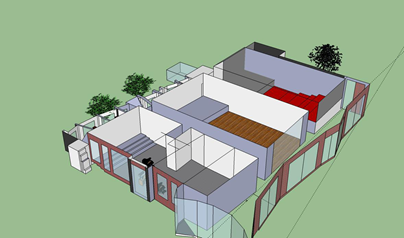
The place of personal learning can find its feet and show its evidence. I will finish with a building created in google sketch up by a year 7 students and a link to an online novel written by my son Jack (16) both examples of personal learning and endeavour.

pac2

image

image


Sunday, December 27, 2009

A simple slideshow embed

I have put a few tables with photos into my blog. I was thinking a slideshow might be better take up less space, run itself and be more attractive. I found a page you could copy the address for a Picasa slideshow into as with many things a little further investigation and I learnt how to do this directly from within Picasa YAY. Here is a video showing how easy this is to do and a sample slide show below.


Here is a sample slide show. Some of the pics have been altered to make up the banner for my blog which feature my mum Dorothy or Dot as she was known. My brothers and sister also appear in some of the pictures. Need to add a few more in memory of Mum. Mum I miss you!


Tuesday, November 3, 2009

Zac's Bridge thinking

Having been on a visit and taken some photos the students have a real idea about the bridges and their design features and construction.
utterli-image

Mobile post sent by davein2it using Utterli. reply-count Replies. mp3


Monday, November 2, 2009

Still banging on about it


My last post presented a little snippet from a Cellphone policy from Montgomery School District. Essentially it said no phone/mobile device should enter or be used here. The policy was written perhaps four years ago and could have been seen as a safe move given what the perceived possible contribution to learning compared to possible issues unacceptable use might raise. The balance is tipping at lightning speed (and forever) with devices such as the ipod touch, iphone,  android devices, netbooks etc. Their possible contribution is real contribution. Weighing out chirpi on a balance scale by Parahamsa.

I have said and have to repeat that management issues aside we are forgoing an opportunity to learn to be better; to move into a new paradigm rather than just admire it from afar as the kids get on with it. The steps we need are bolder and quicker. Schools are slowly coming round to the idea of 1to1 provision and here it is in an ipod touch for $300 New Zealand Dollars. The video below looks at the experience of a school in the U.K.

A Safe Step may be to allow these touch devices which though not a phone are all but and use our schools wireless networks for connectivity. The next generation will undoubtedly have cameras and mics making them a reasonably solid platform for learning especially once a few apps come down from the appstore. What I think we need to realise fast is that we if we converge some of the functionality we have been get elsewhere into one of these devices they are not as expensive as they first seem.

This to me is one device format that we will see in almost everyone’s future and generally it will contain a phone as well.

These devices will undoubtedly enable learning, save lives and change lives.

Are we big enough to let them change our schools?

When will we let this take place?

Here are some of the things an iPhone can do today. This is a small selection There are 100,000 apps in the store many costing $0.99 making opportunities nearly endless.

Camera image $100
Torch image $20
Notebook image $5
GPS image $200
stopwatch image $20
media player image $60
Games console image $400
Mapbook image $10
Spirit level image $20
TV image $100


Others may not agree but a mobile device that has iPhone capability is a point that will soon be achievable for more of the population than having their own pc ever was. To me the important thing is that it will be personal and so will the learning.

Mark Prensky is debating should we give a four year old an iPhone?

Some other links

Elsewhere we can find out about 5 (Free) iPhone Apps Every Parent Should Have.

Exams  phone a friend


Monday, October 26, 2009

Enough said

Montgomery County Public Schools, Montgomery County, Md. "Possession of portable pager on public school property. In this section the following words have the meanings indicated: 'Portable pager' means any device carried, worn, or transported by an individual to receive or communicate messages. 'Public school property' means the grounds of any public school. "Except as provided ..., an individual may not possess a portable pager on public school property. This section does not apply to: handicapped students using portable pagers for medical reasons; law enforcement officers; visitors on public school property for an authorized program, meeting, or function; faculty or staff members employed by a county board; members of any volunteer fire department, ambulance company, or rescue squad, who are designated to possess a portable pager on public school property by the chief of the volunteer fire department, ambulance company, or rescue squad, and the school principal; and students whose portable pagers are contained in vehicles that are on public school property and are not found to be connected with criminal activity.

Shades of grey ??? The policy as outlined by the students ???